Automation
Invoice Processing Workflow With n8n: Automating Document Handling From Google Drive to Email
How to automate PDF invoice handling using n8n, AI extraction, Google Sheets, and Gmail.

Quick answer: an n8n invoice processing workflow watches a Google Drive folder, pulls the text out of each new PDF invoice, uses an AI model to extract the vendor, invoice number, date and total, logs them in Google Sheets, and emails a confirmation through Gmail. It runs on its own, with no templates per vendor.
Introduction
Manual invoice processing is one of the most time-consuming tasks in any finance or operations workflow. Opening emails, downloading PDFs, copying data into spreadsheets, and sending confirmation emails takes hours every week that could be spent on higher-value work.
This workflow removes that repetitive admin work entirely. Using n8n, we connect Google Drive, AI-powered text extraction, Google Sheets, and Gmail into one automation that processes invoices the moment they arrive.
What The Workflow Does
- Watches a Google Drive folder for new PDF invoices
- Downloads the file automatically when detected
- Extracts text content from the PDF
- Uses AI to identify key invoice data (vendor, amount, date, invoice number)
- Appends the extracted data to a Google Sheets database
- Generates a professional confirmation email
- Sends the email via Gmail to the relevant stakeholder
Here’s The Full Automation Workflow
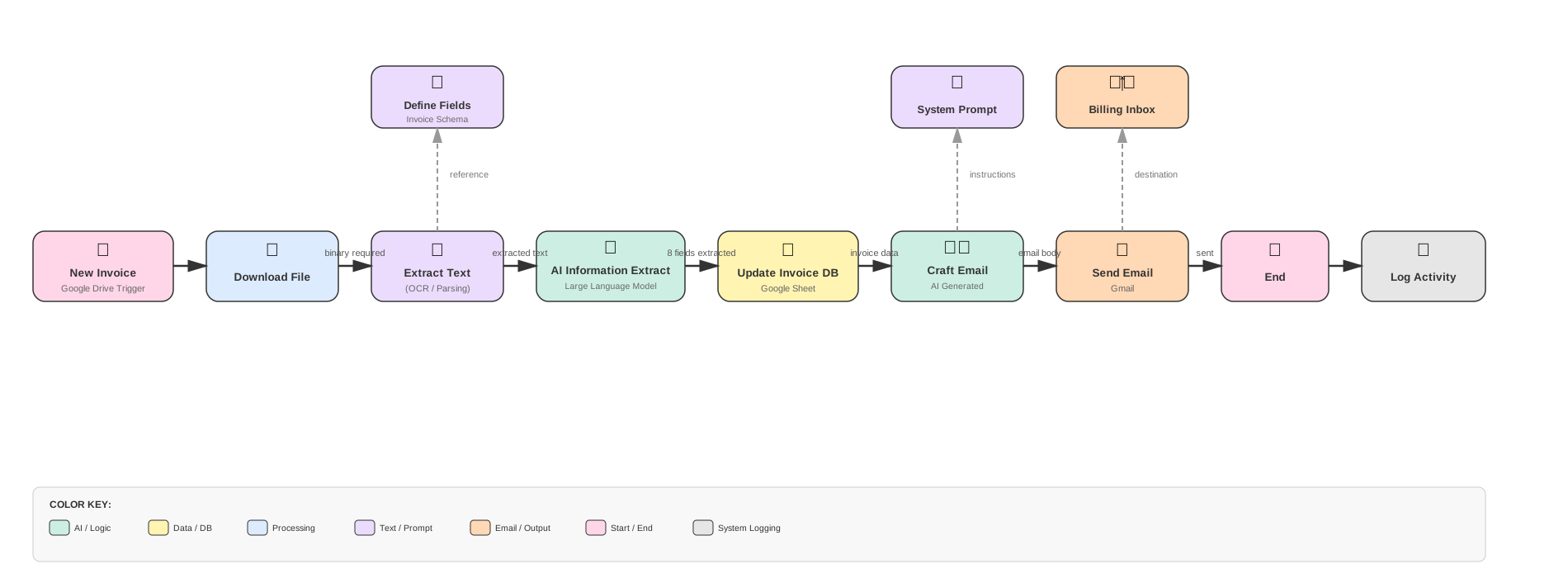
End-to-end invoice automation workflow built in n8n.
Inside The n8n Workflow (Node-by-Node View)
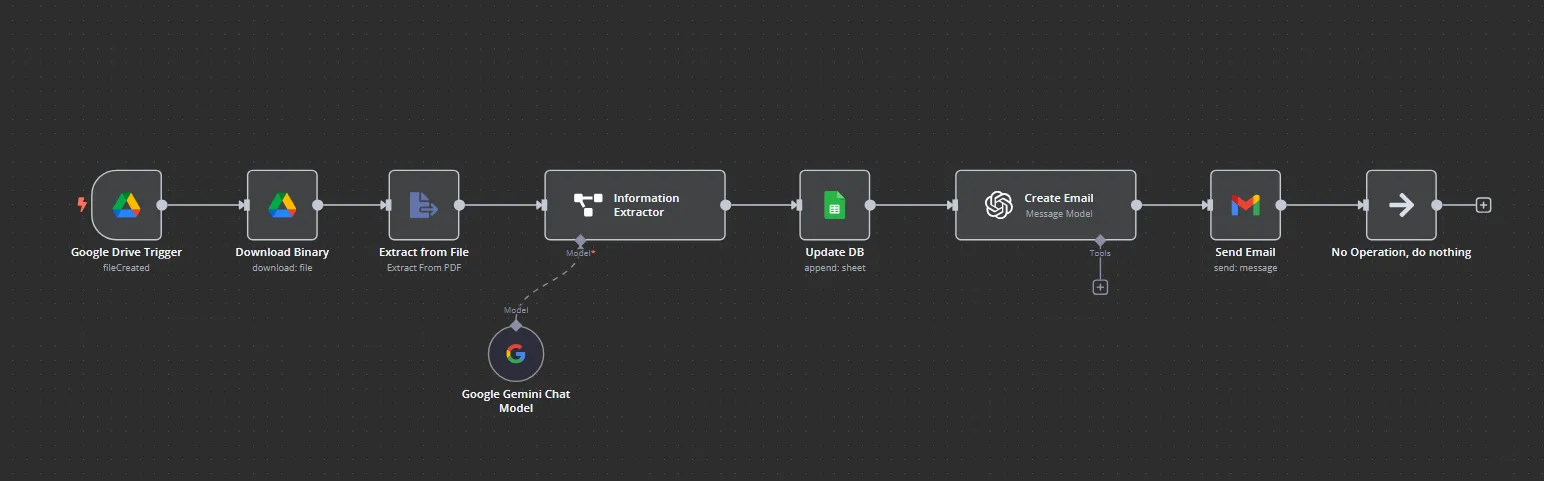
This is the actual n8n workflow used to process invoices.
Node-By-Node Breakdown
Google Drive Trigger
This node monitors a specific folder in Google Drive. When a new file is created (such as a PDF invoice), the workflow triggers automatically. No manual intervention required.
Download Binary
Once triggered, this node downloads the actual file content from Google Drive as binary data, making it available for the next processing steps.
Extract From File
This node extracts raw text from the PDF file. It handles OCR for scanned documents and text extraction for native PDFs, ensuring all invoice content is readable.
Information Extractor (AI Model)
The extracted text is passed to an AI model that intelligently identifies and structures key invoice fields like vendor name, invoice number, date, line items, and total amount.
Gemini Chat Model
Google’s Gemini model powers the AI extraction. It understands invoice formats across different vendors and languages, providing accurate data extraction without custom templates.
Google Sheets Append
The structured invoice data is appended to a Google Sheets spreadsheet, creating a searchable database of all processed invoices with timestamps and extracted details.
OpenAI Email Generator
This node uses OpenAI to generate a professional, context-aware email confirming the invoice has been received and processed, including key details for the recipient.
Gmail Send Email
The final node sends the generated email via Gmail to the appropriate stakeholder, completing the end-to-end automation loop.
Why This Matters
- Eliminates hours of manual data entry every week
- Reduces human error in invoice processing
- Creates an automatic audit trail in Google Sheets
- Speeds up vendor payment cycles with faster processing
- Scales effortlessly as invoice volume grows
- Frees your team to focus on strategic work instead of admin tasks
Download the n8n Invoice Processing Workflow (JSON)
If you’d like to use this workflow in your own n8n environment, email me and I’ll send you the ready-to-import JSON file.
Automation isn’t about replacing people. It’s about removing the repetitive tasks that drain your time and energy. When invoices process themselves, you’re free to focus on the work that actually moves your business forward.
This same principle applies to personal workflows too. For example, you can build an AI discount finder that monitors prices and alerts you to deals without subscribing to newsletters or giving away your data.
Keep reading: a lead generation workflow in n8n, or see how I help with n8n automation.
Frequently Asked Questions
What does an n8n invoice processing workflow do?
It turns incoming PDF invoices into structured data without anyone opening them: trigger on a new file, extract the text, let AI pull out the key fields, save them to a sheet or accounting tool, and notify the right person.
What is n8n and why use it for invoice automation?
n8n is an open-source workflow automation tool that connects apps and services. It’s ideal for invoice automation because it supports AI nodes, file handling, and integrates natively with Google Drive, Sheets, and Gmail.
Can this workflow handle scanned PDF invoices?
Yes. The Extract From File node handles OCR for scanned documents and text extraction for native PDFs, ensuring all invoice content is readable for AI processing.
How accurate is AI invoice data extraction?
AI models like Google Gemini are highly accurate for structured invoice data. They understand various invoice formats across different vendors and languages without requiring custom templates.
Can I modify this workflow for my specific needs?
Absolutely. The downloadable JSON is a starting point. You can add approval steps, connect to accounting software, or route invoices to different workflows based on vendor or amount.