Automation
7 workflow automation examples you can steal this week ⚙️
Seven workflow automation examples for marketing and sales teams, a 5-minute way to pick the right first one, and the build pattern I use in n8n.

Quick answer: The best workflow automation examples for a small marketing or sales team are the boring ones: instant lead alerts with context, a five-minute follow-up, a fake lead filter, booking-to-conversion tracking, auto-indexing new pages, invoice extraction, and a Monday report that writes itself. Pick the one you do every week, that follows clear rules, and that costs you more than 30 minutes. Build that first, then add the next.
The n8n template library lists 13,300 workflow templates as of today. That’s amazing. It’s also the reason so many teams never build a single one.
Thirteen thousand options feels like homework. So the Monday report gets copied by hand again, the new lead sits in a shared inbox until lunch, and someone types invoice numbers into a sheet for the fifth year running.
You don’t need a library. You need one workflow that pays for itself, chosen on purpose.
 Seven good options. You only need one to start.
The idea 💡
Steal one boring, weekly, rules-based workflow and automate it before you touch anything clever.
Why it works 🧠
Because most of the work that eats your week isn’t the skilled part. Asana’s Anatomy of Work Index, a survey of more than 10,000 knowledge workers, found that 60% of time at work goes on “work about work”: chasing updates, searching for information, switching between tools. The same research puts duplicated work at 209 hours a year per person.
Boring work is also the easiest to automate well. It has a clear trigger (a form, a booking, a file), clear rules, and a clear end. AI-heavy projects with fuzzy goals stall. A workflow that moves a lead from a form to the right person in 30 seconds just runs.
7 workflow automation examples to steal
- Lead alert with context. Form fill → look up the company → create or update the CRM record → Slack message with who they are and what they asked. Sales stops opening a blank record. Here’s the lead enrichment version.
- The five-minute follow-up. New lead → personalised email straight away → task for the owner → reminder if nobody has called in an hour. It exists because speed to lead decides deals.
- Fake lead filter. Before anything reaches the CRM, check the email domain, the phone format and the message for bot patterns, and park the suspicious ones for review. Full recipe: the fake leads CRM filter.
- Booking to conversion tracking. A Calendly booking fires a conversion to GA4 and Meta, so ad platforms learn from real meetings, not page views. I run this one on this site: Calendly to GA4 and Meta Pixel.
- New page, instant indexing ping. Publish a page → the workflow tells search engines it exists. Also running here: auto-index new pages.
- Invoice in, row out. A PDF lands in a folder → AI pulls the supplier, amount and due date → a row appears in your sheet → finance gets an email. The n8n invoice workflow walks through it.
- The Monday report that writes itself. Every Monday after midday: pull last week’s sessions from GA4 and new deals from the CRM, have AI write a five-line summary, post it to Slack. Nobody copies a number by hand again. Here’s the full automated marketing report build, including a check that catches any number the AI invents.
How to do it ✍️
- List your repeats. For one week, jot down every task you did more than once. Don’t judge, just list.
- Score each one. Frequency (1 to 5), minutes each time, and “are the rules clear?” (yes or no). Anything with a “no” waits.
- Pick the top score. Highest frequency × minutes, with clear rules. Put the numbers into the automation ROI calculator to see what it’s worth in hours a year.
- Write the recipe in plain words before you open any tool. If you can’t write it, you can’t automate it.
- Build it narrow, run it for two weeks, then add the next one.
The recipe card I use, ready to copy:
WORKFLOW RECIPE
Name: ____________________
Trigger (what starts it): ____________________
Inputs (what data arrives): ____________________
Rules (if this, then that):
  1. ____________________
  2. ____________________
Action (what changes, where): ____________________
Who gets told, and how: ____________________
What happens when it fails: ____________________
Done means: ____________________
Time saved per run: ___ mins x ___ runs a week
Automate it ⚙️
Almost every example above follows the same five-step shape. Learn it once and the rest get quicker:
- Trigger: a webhook from your form, a new calendar booking, a new file, or a schedule (every Monday after midday).
- Filter: drop what shouldn’t continue, such as test submissions, duplicates and spam.
- Think (optional): one AI step for the part that needs judgement: summarise, classify, pull fields out of a PDF.
- Act: update the CRM, send the email, write the row.
- Tell and log: a Slack or email message to a person, plus an error branch that alerts you when a step fails.
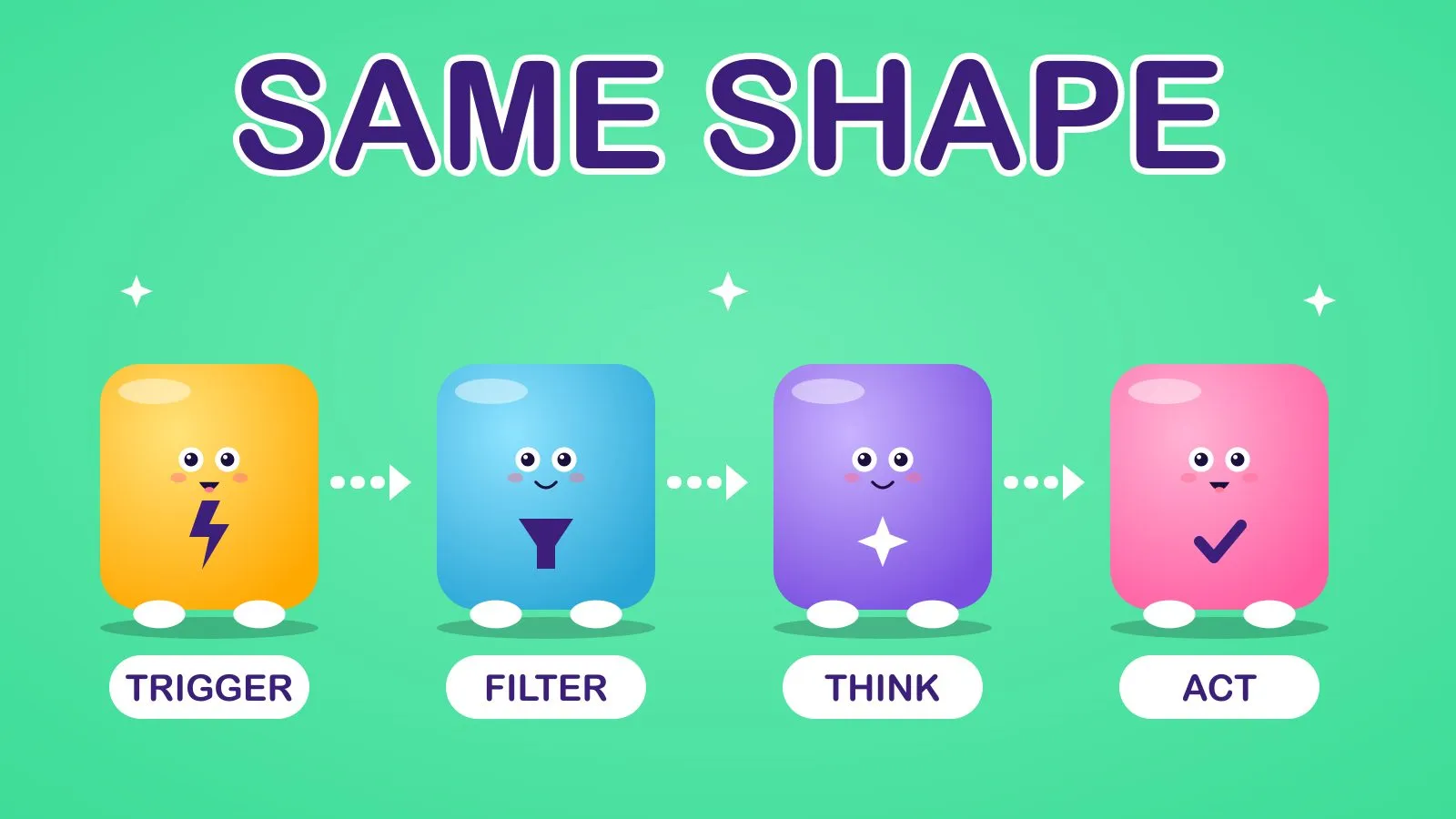 Trigger, filter, think, act, tell. Same shape every time.
The AI step for example 7 (the Monday report):
You write a weekly marketing summary for a busy founder.
Input: last week's GA4 sessions and conversions by channel,
and new CRM deals with stage and value (JSON below).
Write exactly five lines:
1. The headline number and how it compares with the week before.
2. The channel that moved most, up or down, with the number.
3. New deals: count and total value.
4. One thing that looks off and is worth checking.
5. One suggestion for this week.
Plain Australian English. No hype. If data is missing, say so.
DATA: {{ $json }}
I build these in n8n because it’s cheap to run, self-hostable and connects to almost everything. If you’d rather not build them yourself, this is the n8n automation work I do for small teams. Already on HubSpot Professional? Start with these five HubSpot workflow examples that run inside the CRM. Hiring someone? Run the AI automation agency vs consultant test first.
Quick wins to try 🧪
- 🔔 Add an error alert to every workflow you already have. Silent failures are the real cost.
- 🧾 Name workflows by outcome, like “New lead to Slack”, not “Workflow 12”.
- 📅 Turn one weekly calendar reminder into a schedule trigger. If it repeats on a timer, a workflow can do it.
- 🧪 Test with fake data first, then switch on real data on a quiet day.
- 🗂️ Keep a one-page list of what runs, what it touches and who owns it.
- 🩻 Put competitor research on a timer too. A monthly pull from the public ad libraries makes a good first scheduled job: here’s the 10-minute competitor ad research routine.
How to measure it 📊
- Hours saved: minutes per run × runs a month. Check it after the first month, not the first day.
- Error rate: failed runs out of all runs. It should sit near zero, so any failure gets a look.
- Time to action: for lead workflows, minutes from form fill to first contact, before and after.
Frequently Asked Questions
What is an example of workflow automation?
A web form that, when someone submits it, creates a CRM contact, sends them a personalised email and posts an alert in Slack, with no person touching it. Any repeat task with a clear trigger and clear rules is a candidate.
What is the easiest workflow to automate first?
The one you do every week, that follows clear rules and takes more than 30 minutes. Lead alerts and a weekly report are common first picks because the trigger and the result are obvious.
Is n8n good for workflow automation?
Yes, for teams that want low running costs and control. n8n connects to most marketing and sales tools, can be self-hosted, and has AI steps built in. It takes a little more set-up than Zapier.
Do I need AI in my workflow automation?
Usually not. Most of the value comes from moving data and alerting people. Add one AI step only where judgement helps, such as summarising, classifying or extracting fields from documents.
Pick one. Build it this week. The other six will still be here.
Sam
If you want this built for you, book a call.